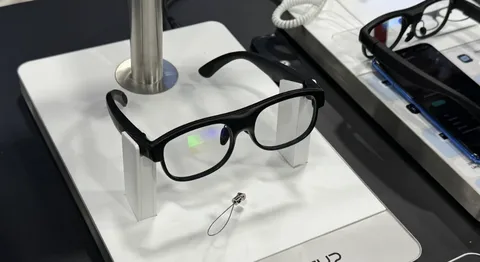
These smart glasses do far more than bridge language barriers. For videographers, they represent a genuine shift in workflow, offering hands-free recording, built-in audio capture, and high-definition video output — all from a device that sits comfortably on your face. Whether you are documenting street culture in Tokyo, interviewing locals in rural Portugal, or shooting a fast-paced travel vlog, the challenge remains the same: capturing high-quality, hands-free video with clear audio in dynamic, unpredictable environments.
 This article explores exactly how AI translate glasses meet that challenge. We will break down their core features, walk through practical techniques for getting the best footage, and examine why 4K video export capability makes them a serious contender in any content creator’s toolkit.
What Are AI Translate Glasses? Redefining Smart Wearables
AI translate glasses are wearable devices that combine real-time language translation with advanced video and audio recording capabilities. Unlike standard smart glasses that focus on a single function, these devices operate as both a communication tool and a professional-grade capture system — making them uniquely suited for videographers and content creators who work across languages and cultures.
At their core, AI translate glasses use onboard artificial intelligence to process speech in real time, converting foreign languages into readable subtitles or audible translations delivered directly to the wearer. But the hardware built around that function is what sets them apart for creative professionals. Equipped with high-definition recording glasses technology, they capture first-person footage from a natural eye-level perspective — something no handheld camera or mounted rig can fully replicate.
 Where a traditional camera demands physical handling, constant framing adjustments, and dedicated attention, AI glasses operate passively. You look at something, and it gets recorded. This fundamental difference frees creators to engage authentically with subjects, environments, and moments rather than managing equipment. For street photographers turned videographers, documentary makers, or travel vloggers, that shift in dynamic changes everything about how stories get told on camera. Brands like ohosunshine have been developing wearable optics with this creator-first philosophy in mind, recognizing that the best footage comes from tools that disappear into the experience.
Essential Features for Content Creators: Hands-Free Recording and Audio Clarity
High-Definition Recording Capabilities
The camera embedded in AI translate glasses is not an afterthought — it is engineered to meet the demands of professional content creation. Most current models capture footage at resolutions up to 4K, with frame rates that support smooth motion in fast-moving environments. This means creators shooting street scenes, live events, or action-oriented travel content get sharp, detailed imagery without ever reaching for a camera body. The eye-level perspective these high-definition recording glasses provide is also inherently cinematic, matching the natural human field of view in a way that mounted chest cameras or handheld rigs simply cannot. Wide-angle lenses on many models further expand the frame, capturing environmental context that enriches storytelling. Because recording is triggered with a single tap or voice command, there is no fumbling with settings mid-scene — the glasses stay in continuous capture mode while you stay fully engaged with your subject.
Optimizing Audio Clarity in Various Shooting Conditions
Video without usable audio is footage without a story. AI translate glasses address this directly through built-in directional microphones positioned to prioritize sounds originating from in front of the wearer — exactly where conversations, ambient sound, and subject audio come from. Many models incorporate active noise reduction algorithms that filter out wind interference, crowd noise, and mechanical hum in real time, preserving vocal clarity even in chaotic environments like markets, festivals, or busy urban streets. This is particularly valuable for videographers conducting on-the-street interviews or documentary-style shoots where an external microphone setup would be intrusive or impractical. The proximity of the microphones to the wearer’s mouth also captures narration cleanly, making voiceover recording while filming a genuinely viable workflow. For creators who rely on authentic, unscripted audio — the kind that defines compelling travel and documentary content — this combination of directional pickup and noise suppression is a practical game-changer.
Practical Guide: How to Use AI Translate Glasses for Videography
Step 1: Setting Up for Hands-Free Recording
Before you start rolling, fit matters more than most creators expect. Adjust the nose pads and temple arms until the glasses sit level on your face — a tilted frame means tilted footage, and no amount of post-processing fully corrects a consistently skewed horizon. Once the fit is dialed in, open the companion app and select your recording resolution. For professional deliverables, lock in 4K; for extended shoots where storage is a concern, 1080p at a higher frame rate gives you smooth motion with smaller file sizes. Enable optical stabilization if your model supports it — this is the single biggest difference between usable handheld-style footage and shaky, unwatchable clips. Finally, set your preferred trigger method. Voice activation keeps your hands completely free during interviews or run-and-gun street work, while a tap command gives you more precise control in quieter environments where a spoken command would be disruptive.
Step 2: Ensuring Clear Audio Capture During Shoots
Audio preparation starts before you press record. Assess your environment first — identify dominant noise sources like traffic, HVAC systems, or crowd movement, and position yourself so the subject sits directly in front of you, squarely within the directional microphone’s pickup pattern. In windy outdoor conditions, check whether your glasses model includes a foam windscreen accessory; even a basic wind guard dramatically reduces low-frequency rumble that noise reduction algorithms struggle to fully eliminate in post. Inside the app’s audio settings, activate the noise suppression mode appropriate for your environment — most models offer separate presets for indoor, outdoor, and crowd settings. Speak your narration at a natural conversational volume rather than projecting loudly, since the microphones are positioned close to your mouth and will clip if you overload them. Do a ten-second test recording and play it back through headphones before committing to a full shoot.
Step 3: Exporting and Editing 4K Video Footage
Once your shoot wraps, transfer footage via USB-C direct connection rather than wireless sync — 4K files are large, and wireless transfer introduces both time delays and occasional corruption on longer clips. Organize files immediately by scene or location before importing into your editing software. AI translate glasses footage is compatible with all major editing platforms including DaVinci Resolve, Adobe Premiere Pro, and Final Cut Pro, typically in H.264 or H.265 format. When editing, apply color grading before any cropping or reframing — working at full 4K resolution preserves maximum detail and gives you genuine flexibility to punch in on a subject without visible quality loss in the final export. If your delivery platform is YouTube or Instagram, export at the platform’s recommended bitrate rather than maximum to avoid re-compression artifacts. Keep your original files archived; the 4K source footage retains long-term value for recuts, licensing, or repurposing across future projects.
Leveraging 4K Video Export for Professional Content
Resolution is not just a spec — it is a creative asset. When AI translate glasses capture footage at 4K, they are recording roughly four times the pixel information of standard 1080p, and that surplus pays dividends at every stage of post-production. Editors gain the freedom to reframe shots, punch in on a subject’s expression, or stabilize shaky footage digitally without the final export looking soft or degraded. For content creators working across multiple platforms — YouTube, Instagram Reels, broadcast licensing, or client deliverables — that flexibility is genuinely difficult to overstate.
Platform compatibility is another practical advantage. Major streaming and social platforms have progressively expanded their support for 4K uploads, and audiences consuming content on large-screen televisions or high-resolution monitors will immediately notice the difference in sharpness and depth. Travel vloggers showcasing landscapes, documentary creators capturing intricate cultural details, and commercial videographers delivering client work all benefit from the added clarity that 4K footage provides. The eye-level perspective inherent to AI translate glasses makes this even more impactful — fine environmental textures, facial expressions, and background detail that define a scene’s authenticity are preserved in full resolution rather than compressed into a lower-fidelity image.
AI translate glasses make 4K capture accessible in a way that conventional setups rarely achieve. Traditional 4K rigs require deliberate setup, controlled handling, and dedicated attention to framing — conditions that contradict the spontaneous, immersive style of modern content creation. Because these glasses record continuously from a stable eye-level position, creators capture usable 4K footage during natural interactions that a handheld camera would have missed entirely. Combined with H.265 compression, which maintains visual quality while managing file size efficiently, the 4K output from AI translate glasses — including models available through ohosunshine — integrates seamlessly into professional editing pipelines without demanding extraordinary storage infrastructure.
Why AI Translate Glasses Are the Future of Creator Filmmaking
AI translate glasses have arrived at exactly the right moment for videographers and content creators navigating an increasingly complex, multilingual world. As this article has explored, their value extends well beyond language translation — they deliver hands-free recording from a natural eye-level perspective, built-in directional audio with active noise reduction, and 4K video export that integrates cleanly into professional editing pipelines. For creators who have long struggled to stay present in a scene while managing equipment, that combination represents a genuine leap forward.
The practical techniques covered here — proper fit calibration, environment-aware audio setup, and disciplined post-production workflows — close the gap between raw capability and polished, publishable content. These are not workarounds; they are professional methods that treat AI translate glasses as the serious production tool they have become.
Adoption will only accelerate as the technology matures. Improvements in onboard processing power, battery life, and AI model accuracy will continue expanding what creators can accomplish without ever lifting a camera. For videographers willing to rethink their workflow now, AI translate glasses offer something rare: a tool that genuinely changes how stories are captured, not just how they are processed afterward. The most authentic footage has always come from being fully inside the moment — and these glasses make that possible.